Framer vs Squarespace (2026): Motion and Freedom Against the Finished Template
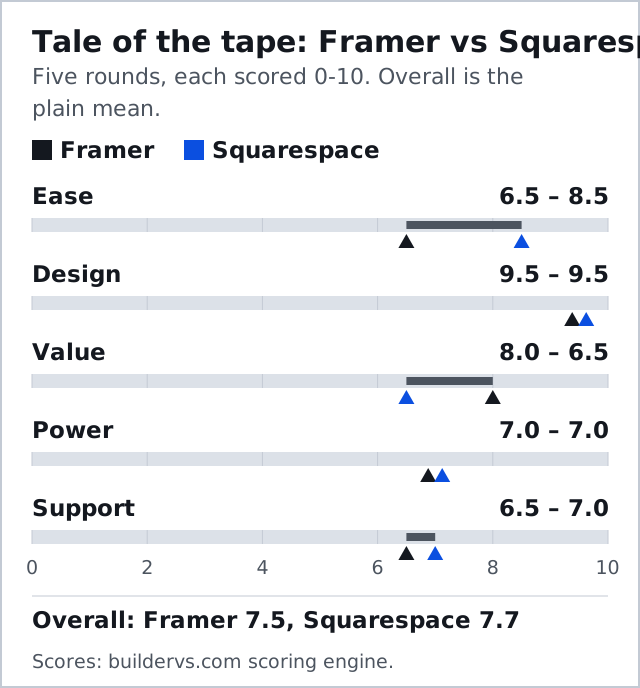
Framer vs Squarespace is one of the closest bouts on our card. Squarespace takes it 7.7 to 7.5, both score 9.5 for design, and the result turns on what the site has to do. Pick Framer if you are a designer who wants motion, a free canvas and a $10-a-month custom-domain site. Pick Squarespace if you need a blog, a store or member content to work out of the box and would rather choose a finished template than build one.
Skip Framer if the site has to sell; it has no native store. Skip Squarespace if you want layouts no template anticipates. Prices below are US list prices taken from both vendors' pricing pages across 9 and 10 October 2026, on yearly billing and before tax.
The Real Trade-Off: A Canvas or a Finished Template
Framer hands you a blank canvas that behaves like a design tool. You arrange frames and stacks, set breakpoints, add interactions, and publish a fast hosted site. Squarespace hands you a designer-made template and an editor, Fluid Engine, that lets you drag blocks onto a grid without breaking the art direction. One is freedom with responsibility; the other is taste supplied in advance.
Both tie on design at 9.5, but they earn the score differently. Framer's ceiling is set by your own skill. Squarespace's is set by its template designers, who are very good. If you cannot say what you would change about a Squarespace template, you do not need Framer's freedom.
Price: Framer's Three Rungs Against Squarespace's Four
Framer's ladder is short. Free publishes on a Framer address with 1 GB of bandwidth; Basic is $10 a month for 30 pages, two CMS collections and 50 GB; Pro is $30 for 150 pages, ten collections and 100 GB; Enterprise is quoted. Squarespace skips the free tier, offers a 14-day trial instead, then sells four rungs, Basic, Core, Plus and Advanced, for $19, $29, $49 and $99 a month when paid yearly, rising to $25, $39, $65 and $139 on monthly billing.
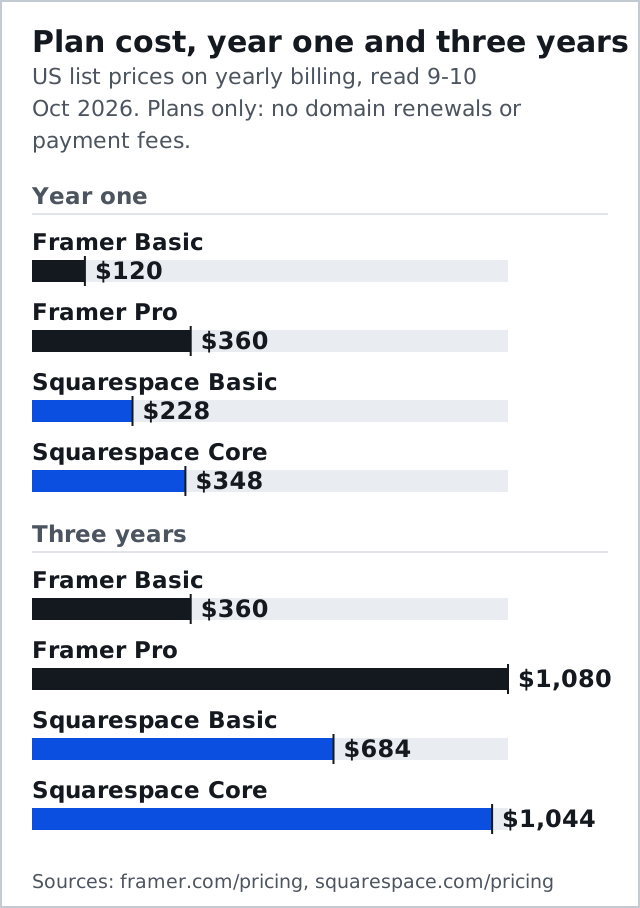
For a simple portfolio, Framer Basic costs $120 a year against $228 for Squarespace Basic, and $360 against $684 across three years. Move up a tier on each side and the order flips: Framer Pro costs $360 a year and Squarespace Core $348, or $1,080 against $1,044 over three years. Both corners add a domain to yearly plans: Squarespace covers year one, and Framer calls its version complimentary. Billing cadence matters more on Squarespace than on most rivals: Basic on monthly billing is $25, or $300 over a year, against $228 paid yearly, so commit annually once the trial convinces you.
| Rung | Framer | Squarespace |
|---|---|---|
| Free | $0: Framer address, 1 GB bandwidth | No free plan; 14-day trial |
| Entry | $10/mo Basic: 30 pages, 50 GB | $19/mo Basic: 2% fee on physical sales |
| Main | $30/mo Pro: 150 pages, 100 GB | $29/mo Core: 0% fee on physical sales |
| Higher | Pro add-ons: $20 per 100 pages, up to 700 | $49/mo Plus: lower digital-sales fee |
| Top | Enterprise: custom quote | $99/mo Advanced: no digital-sales fee |
| Fee on digital sales | No native store | 7% Basic, 5% Core, 1% Plus, 0% Advanced |
Editing, Motion and Responsive Control
Framer wins the motion contest outright. Scroll-linked effects, hover states and component variants live in the canvas, so a designer can build the kind of animated landing page that would need custom code elsewhere. Responsive control is explicit: you design each breakpoint and decide what moves.
Squarespace's Fluid Engine is easier, 8.5 to 6.5 on our ease round, and it keeps a separate mobile layout you can adjust. Its animation options are tasteful and limited. Most owners never miss what they cannot do; designers notice on day one.
Templates tell the same story. Squarespace's library runs to roughly 194 designer-made templates across portfolios, restaurants, retail and services, and its Blueprint AI setup, free on every plan, builds a starting layout and font pairing from a short questionnaire. Framer's marketplace is strong and leans toward startup and portfolio aesthetics, and a template there is a starting canvas you are expected to change. If you want to pick a look and start writing, Squarespace gets you there faster.
Blogging, Store and Scheduling
This is Squarespace's round. Its blog, store, member areas and email tools are part of the platform rather than embeds. Squarespace's cut on physical goods is 2% on Basic and zero from Core upward; on digital goods and memberships the cut steps down from 7% on Basic to 5% on Core, 1% on Plus and zero on Advanced. Squarespace also sells appointment scheduling as its own product.
Run the numbers for a small physical-goods shop: Core costs $120 a year more than Basic, and Basic's 2% fee costs $120 on $6,000 of sales. Below $6,000 a year in physical sales, Basic is cheaper; above it, Squarespace Core is. Framer has no comparable answer, because its pricing page lists no store, and selling means embedding someone else's checkout.
SEO and CMS Limits
Power finishes level at 7.0. Framer's CMS holds two collections and 1,000 items on Basic and ten collections and 2,500 items on Pro, and Pro add-ons stretch it to 40 collections and 40,000 items. Squarespace's blog and collections suit a small business's content without counting items for you, and its SEO panel covers titles, descriptions, slugs and redirects. Neither offers the deep technical control of a developer-grade platform.
Lock-In and Leaving
Framer has no export at all, so a Framer site is rebuilt if it ever moves. Squarespace's export is partial. Its help centre (updated 9 October 2026) describes a WordPress-format .xml file that carries layout pages, one blog with its posts, and text and image blocks, while store pages, products, video and audio blocks, custom CSS and style settings stay behind. You cannot export from a trial site either. Neither is a platform you leave cheaply, and Squarespace's July 2026 price rise is a reminder that captive customers pay renewal increases.
Support
Support goes to Squarespace, 7.0 to 6.5. Squarespace offers email around the clock and live chat on weekdays, with no phone line. Framer answers by email and ticket and leans on documentation and a large community. Neither will call you back at midnight.
Edge Cases
- A photographer selling prints: Squarespace Core, unless the portfolio's motion matters more than the shop.
- A startup landing page with a waitlist: Framer Basic, at $10 a month on yearly billing.
- Courses or memberships: Squarespace, on Plus or Advanced to cut the digital-sales fee to 1% or nothing.
- A team of three editing one site: price Framer's $20 editor seats before assuming it is the cheaper corner.
The Decision, Job by Job
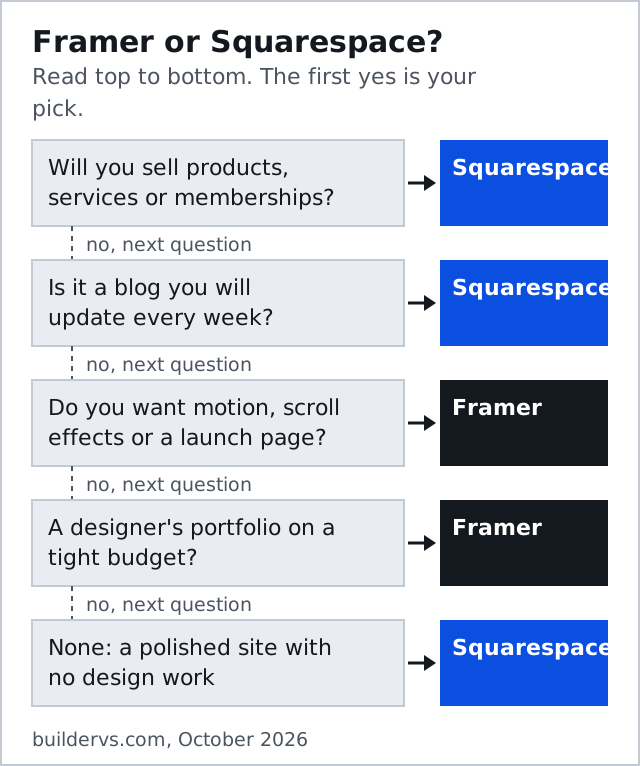
Squarespace takes the decision, 7.7 to 7.5, because ease and support count for every owner and selling counts for most. Framer wins the readers who will open the canvas and enjoy it, and for them Framer is the better tool at a lower starting price. Squarespace's other bouts are on the Squarespace vs Webflow page, and the method behind the scores is on how matchups are scored.
After the bell
Is Framer better than Squarespace?
Is Framer cheaper than Squarespace?
Framer or Squarespace for a portfolio?
Does Squarespace have a free plan?
Can I export a Framer or Squarespace site?
Every bout on this site is judged on the same five rounds. See the full matchup card or read how matchups are scored.