Framer vs Wix (2026): The Designer's Canvas Against the Everything Platform
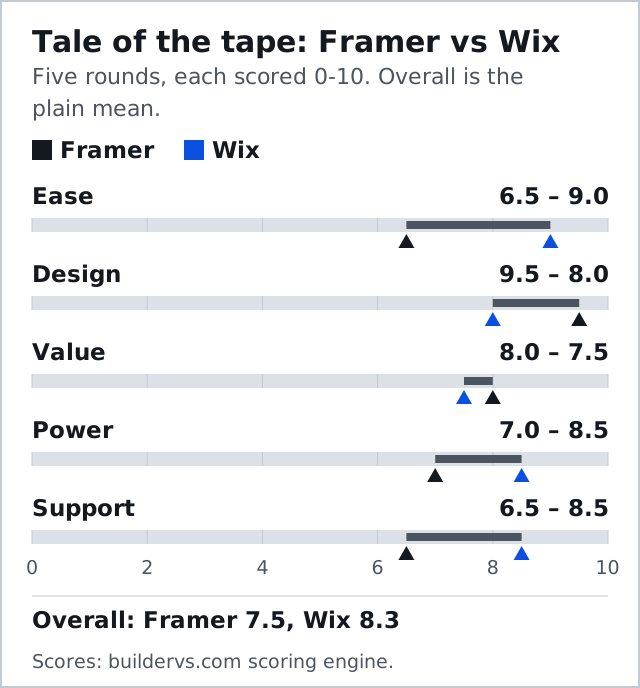
Framer vs Wix is a bout between a design canvas and a business platform, and our five rounds give it to Wix, 8.3 to 7.5. That verdict belongs to the business owner: if the site has to sell, take bookings or be run by someone who has never opened a design tool, Wix is the safer corner. If you are a designer, a startup or a portfolio owner who cares how the page moves, Framer wins the rounds you care about and costs less to start.
Skip Framer if you need a store. Skip Wix if the first thing you would do in its editor is fight it for pixel control. Prices below are from the two vendors' US pricing pages, checked on 10 October 2026, on yearly billing and before tax.
Two Different Machines
Framer started life as a prototyping tool and still thinks in frames, stacks, components and breakpoints. You design on a canvas that a Figma user recognises at once, and Framer publishes the result as a fast hosted site. Animation and scroll effects are native rather than bolted on, which is why Framer's design score of 9.5 ties the best on our card.
Wix is an all-in-one business platform that happens to include a website editor. The classic Wix Editor lets you drop anything anywhere, and around it sit stores, bookings, restaurant ordering, memberships and an app market. Wix appears on this site only as an opposing corner, so treat its details here as comparison-level fact. The short version: Framer is a design tool that publishes; Wix is a business system that designs.
What You Pay: Free Tiers, Basic and Pro Against Light and Core
Both corners let you start for nothing, with real limits. Framer's free plan publishes on a Framer address with 1 GB of bandwidth and no custom domain, and Framer itself describes it as best suited to non-commercial use. Wix's free plan carries Wix branding on a Wix address and cannot sell. Neither free tier is a business site; both are a fair way to test the editor.
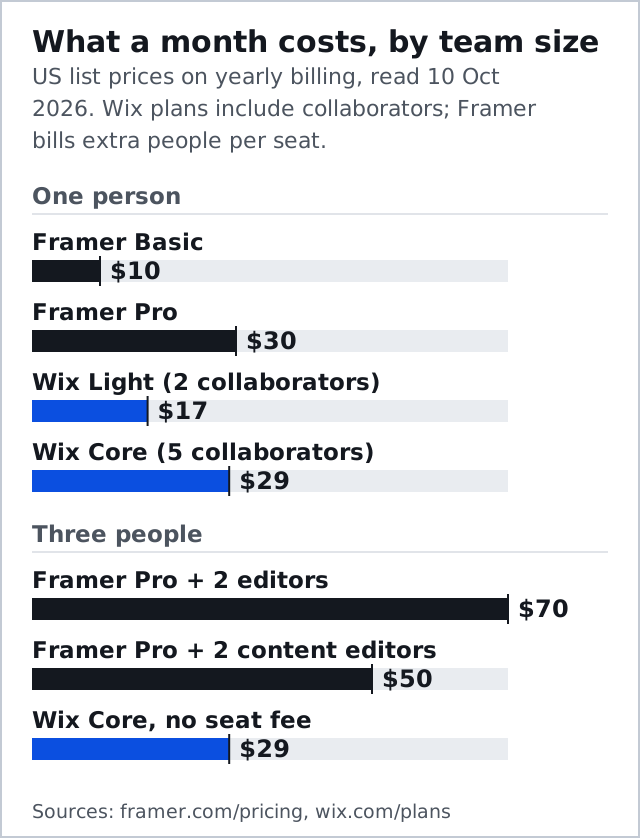
The paid ladders split cleanly. Framer Basic is $10 a month for 30 pages, two CMS collections and 50 GB of bandwidth, and Pro is $30 a month for 150 pages, ten collections and 100 GB. On the Wix side the rungs are Light at $17, which takes no payments, then Core at $29, the first rung that sells, then Business ($39) and Business Elite ($159). Framer's page displays these figures with the yearly toggle on and throws in a domain on yearly plans; Wix bundles a one-year domain voucher with its yearly paid plans.
| Rung | Framer | Wix |
|---|---|---|
| Free | $0: Framer domain, 1 GB bandwidth, no custom domain | $0: Wix branding and address, cannot sell |
| Entry | $10/mo Basic: 30 pages, 2 CMS collections, 50 GB | $17/mo Light: 2 GB storage, 2 collaborators, no payments |
| Main | $30/mo Pro: 150 pages, 10 CMS collections, 100 GB | $29/mo Core: 50 GB storage, 5 collaborators, takes payments |
| Growing | Pro add-ons: $20 per 100 extra pages, up to 700 | $39/mo Business: 100 GB storage, 10 collaborators |
| Top | Enterprise: custom price and limits | $159/mo Business Elite: unlimited storage, 100 collaborators |
| Extra people | $20/mo per editor, $10/mo per content editor | Collaborators included by plan |
Team Cost: Framer Seats Against Wix Collaborators
This is the round the aggregator pages skip. Framer charges for people: each additional editor is $20 a month and each content editor, who can change words and CMS entries but not the design, is $10. Wix includes collaborators in the plan instead, two on Light, five on Core and ten on Business.
So a solo designer pays less on Framer, $10 on Basic against $17 for the cheapest Wix plan with a custom domain. A three-person team flips it. Framer Pro with two more full editors costs $70 a month, or $50 if the other two only edit content. Wix Core covers all three people for $29. If your site is run by a committee, that difference is real money every month.
Design and Motion
Design goes to Framer, 9.5 to 8.0, and it is the round Framer was built to win. Scroll-triggered effects, interactive components and variants are part of the canvas rather than plugins. Wix offers animation and a huge template library, but its classic editor is about placement, not choreography, and its free-form canvas makes you repair mobile layouts by hand.
Ease goes the other way, 9.0 to 6.5. Framer will still confuse someone who has never used a design tool, because it asks you to think in stacks and breakpoints. Wix asks almost nothing and publishes a site in an afternoon. The question is not which editor is better. It is whether the person at the keyboard is a designer.
Selling Things
This round is not close. Wix sells natively from Core at $29 a month, takes no Wix transaction fee on top of your payment processor, and adds bookings and restaurant ordering as installable features. Framer's pricing page lists no store at all; our scoring notes record that selling on Framer means embedding a third-party checkout, such as a buy button from a commerce platform. Treat Framer as a marketing site that can link to a shop, not as the shop.
If selling is the business, the decision ends here: start with Wix. If the site's job is to win attention and send visitors elsewhere to buy, Framer loses nothing in this round that it needs.
CMS and SEO Limits
Framer's CMS is real but sized for marketing sites: two collections and 1,000 items on Basic, ten collections and 2,500 items on Pro, and Pro add-ons that stretch to 40 collections and 40,000 items at $40 per ten collections and $20 per 10,000 items. That covers a blog, case studies and a jobs board comfortably. Site search and redirects both appear on its plan comparison.
Wix's SEO tooling is broad for a small business: full meta control, structured data, redirects and guided setup. Power goes to Wix, 8.5 to 7.0, mostly because Wix does far more around the website. Neither is the tool for a thousand programmatic pages; for that, look at the Webflow bouts on our card instead.
Lock-In on Both Sides
Here the two corners agree, and not in your favour. Framer has no export: no HTML, no code archive, no button. Wix exports essentially nothing either, and adds a second lock, because its help centre says a template cannot be switched once a site exists. Whichever you pick, you are picking it for the life of that site, and leaving means rebuilding.
The practical defence is the same on both platforms. Keep your copy, images and product data in files you own, register your domain where you can move it, and treat the site as a rental you can furnish quickly somewhere else.
Where Wix Studio Fits
Agencies comparing Framer with Wix are usually comparing Framer with Wix Studio, Wix's separate responsive editor for client work. Its plans run from Basic at $19 a month to Elite at $159, and it answers the mobile complaint about the classic editor. Framer answers agencies differently: its pricing page says members of its Pro Experts programme get free editor access on client projects.
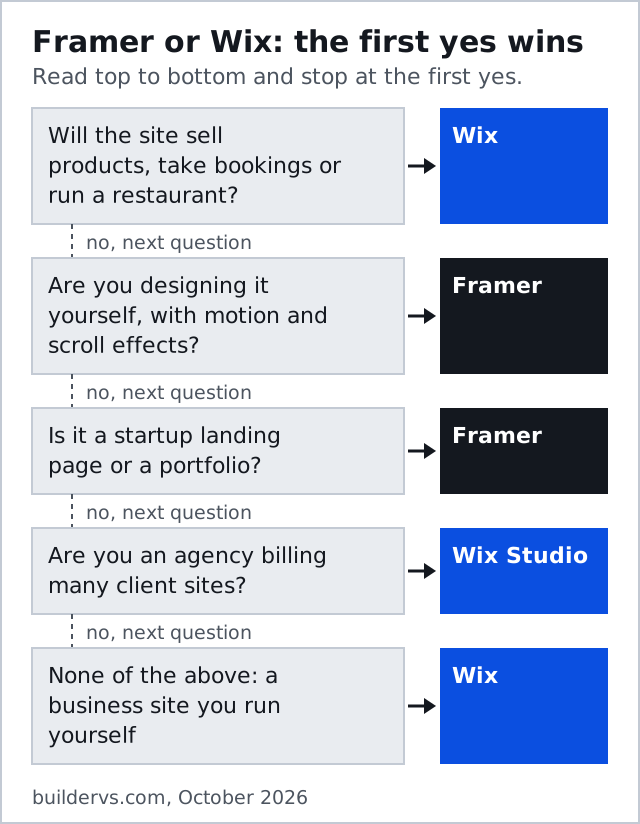
If you build many small client sites that need bookings or payments, Studio is the more complete engine. If you sell design and motion to startups, Framer is the sharper tool, and its seat model rewards keeping clients on content-editor seats.
Affiliate link. We may earn a commission — it never moves a ranking.
Edge Cases
- A portfolio that also sells a few prints: Framer for the portfolio, with a checkout embed, or Wix Core if you want orders and inventory in one place.
- A restaurant or salon: Wix, on ordering and bookings alone.
- A startup that might grow into a content engine: start on Framer Pro, and watch the 2,500-item CMS line before it becomes a migration.
- A non-designer who loves a Framer template: possible, but budget time to learn the canvas before launch day.
Who Should Pick Which
Wix wins the card, 8.3 to 7.5, and for most business owners that is the whole answer. Framer wins the reader this card under-weights: the designer, the startup marketer and the portfolio owner, for whom design and value are the rounds that matter and a store is someone else's problem. Our five-round method is explained on how matchups are scored, and Framer's other bout, against a heavier design tool, is on the Webflow vs Framer page.
After the bell
Is Framer better than Wix?
Is Framer cheaper than Wix?
Can you sell products on Framer?
Framer or Wix for a portfolio?
Can I move a site from Wix to Framer?
Every bout on this site is judged on the same five rounds. See the full matchup card or read how matchups are scored.