Webflow vs Wix (and Wix Studio) 2026: Control Against Completeness
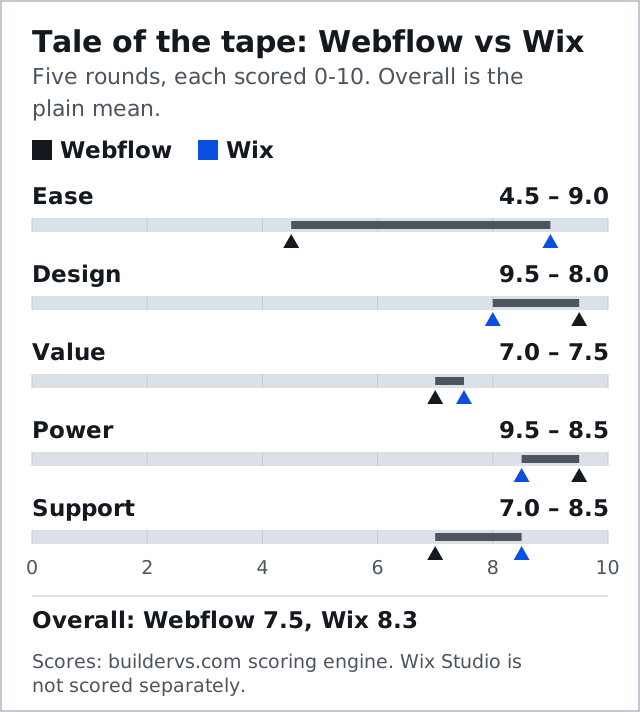
One corner hands you the CSS box model. The other hands you a business in a box. For someone building their own site, Wix wins this bout 8.3 to 7.5 on our five rounds, and it is not a controversial result. For someone building sites for clients, the opponent that matters is not classic Wix at all but Wix Studio, and on a ten-site book Studio's per-site plans undercut Webflow's by $720 a year before a single extra seat is bought.
So this page runs two weigh-ins on one sheet. The first is classic Wix against Webflow, for the owner-operator. The second is Wix Studio against Webflow, for the freelancer or agency. Every price below comes from a vendor's US pricing page, checked across 9 and 10 October 2026, billed yearly, before tax. Skip Webflow if you will never study layout; skip classic Wix if you will ever need to hand a client their files.
Two Machines Built For Different Hands
Webflow's Designer is a visual front end for the stylesheet. Divs, flexbox, grid, classes and breakpoints are set by hand, and hosting is welded on, so you never buy the tool without the servers. The site-plan ladder is short: Starter is free on a webflow.io address with two static pages and 1 GB of bandwidth, Basic is $15 a month for up to 300 static pages with no CMS, and Premium is $25 a month and adds the CMS, site search and form file uploads. The Team platform plan, $2,500 monthly under a yearly contract, serves a different buyer altogether.
Wix appears on this site only as an opposing corner, so read what follows as comparison-level fact rather than a full review. Its classic editor places elements by absolute position, so nothing is forced into a grid. Billed yearly, its four paid plans cost $17 a month for Light, $29 for Core, $39 for Business and $159 for Business Elite. Light cannot take payments; Core is the first tier that can. A domain voucher covering year one comes with yearly paid Wix plans.
Two Editors, One Opponent
Most comparisons treat Wix as one product. It is two. The Wix Editor is the consumer canvas that most small businesses meet first. Wix Studio is a separate responsive editor, sold on its own plan page and aimed squarely at agencies and freelancers: Basic at $19 a month, Standard at $27, Plus at $34 and Elite at $159, all billed yearly and paid up front.
The split matters more than it looks, because Wix's own help centre says sites cannot be moved between the Wix Editor and Wix Studio, and a template cannot be swapped after a site is created. Choosing the editor is therefore a permanent decision about that site. If you are an owner, you will almost always be on the Wix Editor. If you are being paid to build, Studio is the version of Wix that belongs in the ring with Webflow, and that is the comparison the rest of the internet keeps skipping.
What It Costs: Year One, Year Three, Ten Clients
For a single owner site with a CMS, Webflow Premium costs $300 a year. Wix Light costs $204 a year but cannot take a payment, so the like-for-like Wix figure for a site that sells anything is Core at $348. Over three years the gap stays the same shape, because neither vendor printed a renewal increase on its site plans when we checked: $900 for Webflow Premium against $1,044 for Wix Core.
Domains tilt it slightly. Wix's own domain guide prices a .com at $7.90 in the first year and $21.35 a year after, and the first year comes free with an annual plan, so a Wix Core owner pays about $1,086.70 over three years including the domain. Webflow's pricing page lists no bundled domain, so add whatever your registrar charges. Either way, the owner's three-year bill differs by roughly the price of a decent lunch each quarter, and it should not decide the bout.
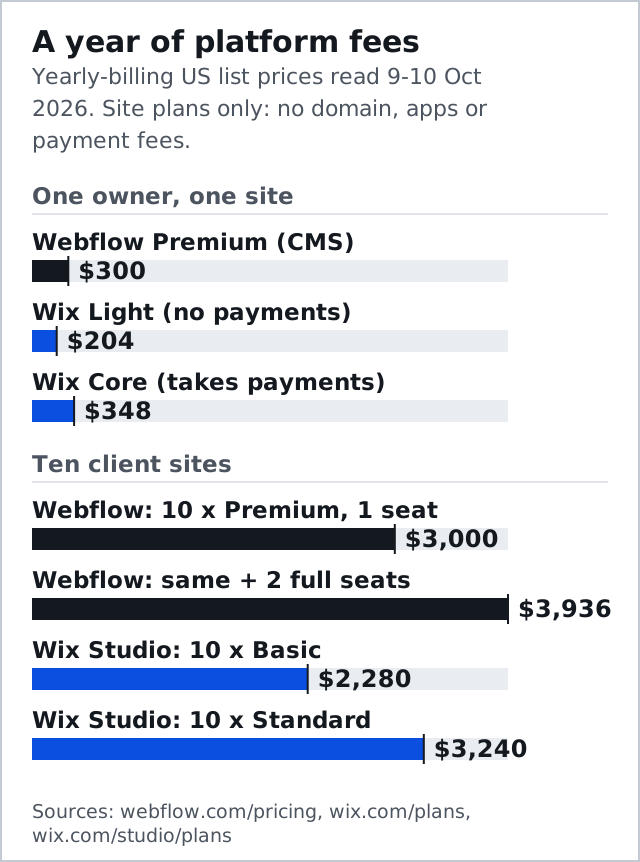
The client book is where the money starts to talk. Ten client sites on Webflow Premium cost $3,000 a year, and each paid site plan comes with the free Starter Workspace and its one seat. Ten sites on Wix Studio Basic cost $2,280; move them all to Standard so every client can take payments and the figure rises to $3,240. Add two colleagues to the Webflow workspace at $39 a month each and Webflow's book reaches $3,936.
Wix Studio's plans page counts collaborators per site plan, from three on Basic to 100 on Elite, and shows no separate per-seat charge. We would still confirm how a three-person team is billed before signing, because that line is where agency budgets usually go wrong.
| Rung | Webflow | Wix | Wix Studio |
|---|---|---|---|
| Cheapest custom-domain plan | $15/mo, Basic (no CMS) | $17/mo, Light (no payments) | $19/mo, Basic (no payments) |
| Cheapest plan that takes payments | $29/mo, Ecommerce Standard plus a 2% Webflow fee | $29/mo, Core, no Wix transaction fee | $27/mo, Standard |
| Mid-tier | $25/mo, Premium with CMS | $39/mo, Business | $34/mo, Plus |
| Top self-serve tier | $212/mo, Ecommerce Advanced | $159/mo, Business Elite | $159/mo, Elite |
| Team cost | $39/mo per full seat, $15/mo per limited seat | 2 to 100 collaborators, set by plan | 3 to 100 collaborators, set by plan |
Wix Studio vs Webflow: The Agency Bout
Put the two professional tools side by side and the trade becomes clear. Wix Studio is cheaper per site at the bottom of a book and gives clients the Wix app market, bookings and support line they would get anyway. Webflow is dearer per site and per seat, and in return it offers the two things a serious agency eventually needs: a code export on any paid Workspace, starting with Core at $19 a month, and a main site plan whose CMS holds 20,000 items across 40 collections.
Studio's CMS ceiling depends on the plan. Basic carries 1,500 items, Standard 4,000 and Plus 20,000, so a client with a large catalogue or a growing blog lands on Plus at $34 a month before Webflow's $25 Premium runs out of room. That inverts the price story for content-heavy work, and it is the round agencies should test before they standardise on either platform.
Handover is the last round. A Webflow client can be given a $15 limited seat to edit content without touching the design, and the site can leave as static files if the relationship ends. A Wix Studio client stays inside Wix for the life of the site. If your agency sells sites as assets the client owns, Webflow is the safer contract. If you sell a managed service on a monthly retainer, Wix Studio is the cheaper engine to run it on.
Affiliate links. We may earn a commission — it never moves a ranking.
Who Has To Learn What
Ease goes to Wix, 9.0 to 4.5, the widest round on the card. A first-time builder can publish a Wix site in an afternoon. The same person needs weeks with Webflow, and some never get there, because the tool will not hide HTML structure and CSS layout from you. Webflow University is a genuinely serious free curriculum, which is a telling thing for a product to need.
The fairer reading of that 4.5 is about who pays for the learning. An agency spreads the weeks of study across every client it will ever build for; a café owner spreads them across one site. The same investment is sensible for one reader and absurd for the other, which is why this bout produces different winners for different readers without either verdict being inconsistent.
The Mobile Problem Nobody Solves For You
Absolute positioning feels wonderful until the viewport changes. On the classic Wix canvas, the desktop layout does exactly what you asked and the mobile view then needs correcting element by element. It is the most durable complaint about the platform. Wix Studio exists partly to fix it, with a responsive editor that behaves far more like Webflow's breakpoints, which is one more reason the agency comparison belongs to Studio.
Webflow takes the design round 9.5 to 8.0 because its ceiling is whatever a browser can render rather than whatever a theme allows. Learn the box model once and responsive behaviour holds without babysitting. You pay in comprehension up front instead of in clean-up for as long as the site lives.
When Something Breaks At 2am
Support goes to Wix, 8.5 to 7.0. Wix runs 24/7 phone callback and chat, the strongest support offer of any platform we score. Webflow answers by email and ticket during business hours, leans on its university and a very large community forum, and reserves priority support for its platform plans. Wix answers the phone; Webflow teaches you well enough that you rarely need to call. Only one of those helps a non-developer whose checkout fails at two in the morning.
Power, Apps, And The Cost Of Selling
Power goes to Webflow, 9.5 to 8.5. Its advantage is structure: collections with reference fields, meta driven by CMS fields across thousands of pages, custom code, and staging and roles that make a handover survivable. Wix is far from weak here. Full meta control, schema, redirects and its SEO tools cover what most small businesses need, and its app market turns bookings, memberships and restaurant ordering into installs rather than projects.
Commerce flips value to Wix, 7.5 to 7.0. Wix Core costs $29 a month and takes no Wix transaction fee, so you pay only the payment processor. Webflow Ecommerce Standard also costs $29 a month, for 500 items, and adds a 2% Webflow fee on every order; the fee disappears at Plus, which costs $74 a month. Same headline price, and only one of them takes a slice of every sale.
Who Owns The Files
Webflow's export is partial but real. On a paid Workspace it produces HTML, CSS and JavaScript with image and font assets, one file per static page. It leaves behind everything dynamic: collection entries, store records, logins, form handling and search. For a brochure site that is a working exit. For a database-driven site it is a keepsake.
Wix exports essentially nothing, and adds two locks on top: no template switch after creation, and no move between its two editors. Most small business sites are never migrated, so this does not make Wix a bad choice. It does mean the decision compounds, because every month spent building on Wix raises the cost of ever leaving.
Edge Cases The Card Doesn't Score
- A brochure site with no CMS: Webflow Basic at $15 a month is cheaper than any paid Wix plan, if you can build it.
- A designer who wants Webflow but a client who wants Wix's support line: build in Webflow and give the client a limited seat, or accept that the client's preference is the brief.
- A store under a couple of hundred products run by its owner: Wix Core, on the transaction fee alone.
- Localisation and multi-language SEO: Webflow, though its localisation features sit on higher plans, so price them before promising them.
One more edge case catches people out. Wix's 14-day refund window applies to new plans only, not to renewals, so a forgotten site renews with no refund on offer. Set a calendar reminder a month before each renewal on whichever platform you choose.
Calling It
Wix, 8.3 to 7.5, on three rounds to two. A 0.8 margin across five equally weighted rounds is a clear decision, not a knockout, and weighting is the whole story: zero out ease, as a professional effectively does, and Webflow wins the same card. That is not a contradiction. It is the scoring telling you the result depends on whose hands are on the mouse. The full method is on how matchups are scored.
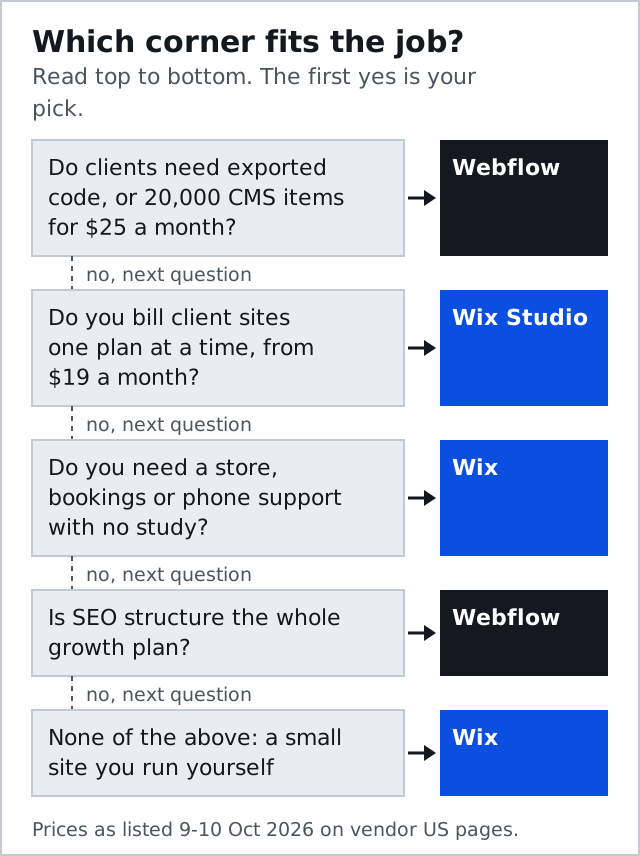
- Building and running your own site, from a restaurant to a salon: Wix.
- Freelancer or agency handing over sites clients own, or building a content engine: Webflow.
- Agency running many small client sites on a monthly retainer: Wix Studio, on price per site.
- Marketing team needing staging, roles and a clean handover: Webflow.
- Anyone who needs a person on the phone at 2am: Wix.
Webflow appears in more bouts than any other builder we score, and the pattern repeats across every head-to-head on the card: it beats anything on capability and loses to anything a beginner can operate.
After the bell
Is Webflow better than Wix?
Is Wix Studio better than Webflow for agencies?
Can you move a site from Wix Studio to Webflow?
Is Wix Studio free?
Which costs less to run a small store?
Every bout on this site is judged on the same five rounds. See the full matchup card or read how matchups are scored.